

Company Management
Discover multi-tenant organization boundaries, Super User administrative functions, company settings, billing configuration, and comprehensive Role-Based Access Control (RBAC).
Overview
Companies (also referred to as Tenants) are the top-level organizational units in Tensoract. Each company maintains its own dedicated, strictly isolated users, projects, datasets, workflows, and settings.
Super User Administration
The Super User role has cross-tenant access. Super Users manage all companies from the Companies page, accessible exclusively to Super Users in the left sidebar.
Super Users Can:
- View all registered companies: Access the global directory of all active and inactive client tenants.
- Create new companies: Provision new workspaces with custom legal names, domains, and role policies.
- Manage billing & subscription plans: Edit billing contact information and subscription plan details.
- Company status lifecycle: Activate or deactivate any company on demand.
- Tenant deletion: Delete a company (scheduled for permanent deletion following the mandatory retention period).
Step-by-Step Guide to Creating a Company
Log in as Super User and navigate to Companies
Click the Companies icon in the primary navigation sidebar.
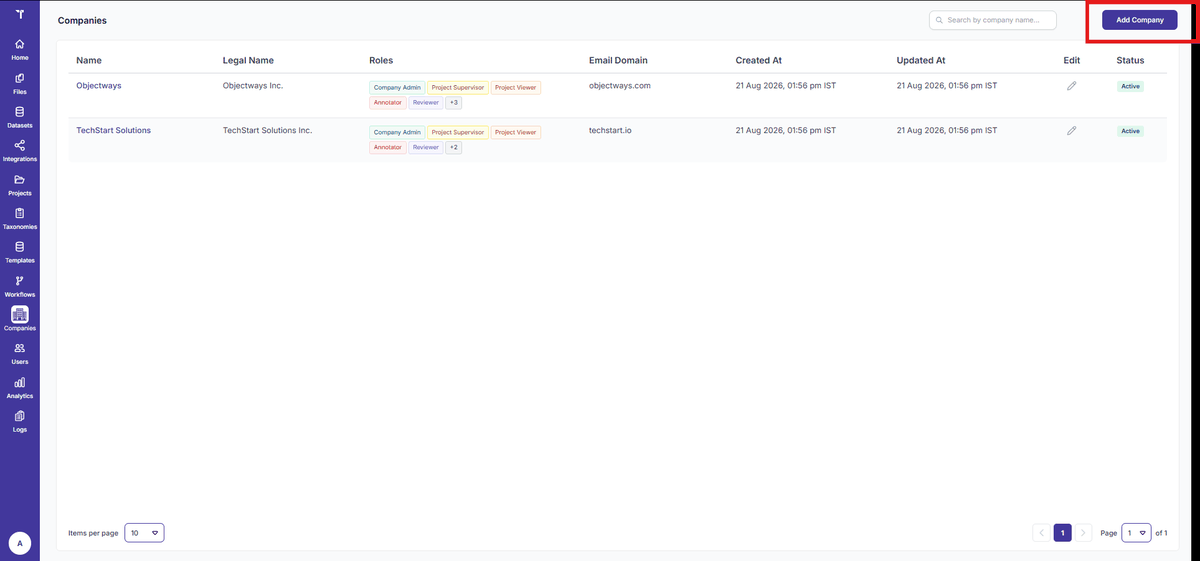
Figure 1: Companies List Page
Click the Add Company button
The Add Company modal dialog will open.
Enter company profile metadata
Fill in the Company Name, Business Legal Name,
and authorized corporate Company Domain (e.g. objectways.com).
Select allowed Roles
From the dropdown menu, choose which platform roles will be permitted within this company workspace.
Click Save
The new company workspace is immediately created and set to active status.
Company Settings
Super Users operate within their assigned tenant. They can view and edit their own company details. Editable fields include Company Name, Business Legal Name, Company Domain, and Roles.
Step-by-Step Guide to Editing Company Details
Click the Edit icon for the target tenant
Locate the tenant row in the Companies list and click the edit pencil icon.
Update details
Modify the Company Name, Business Legal Name, or Domain as needed.
Update billing details
Navigate to the Billing Contact section and update the Name, Email, and Phone Number.
Click Save Changes
The modifications take effect immediately across all users within that tenant.
Roles (RBAC Reference)
Tensoract utilizes Role-Based Access Control (RBAC). Ten standard roles are available to enforce least-privilege security across operations:
Super User
Platform-level administrator with cross-tenant access. Manages companies, analytics, audit logs, and system settings. Not scoped to any single company.
Company Admin
Scoped to a single company. Full operational privileges within that company: user management, project management, datasets, workflows, taxonomies, and settings.
Project Supervisor
Full operational access within an assigned project including team management, task oversight, and configuration.
Project Viewer
Read-only access to an assigned project. Can view dashboards and download exports.
Annotator
Responsible for labelling tasks and submitting them for review.
Reviewer (QC)
Assesses annotator work. Can approve, reject, or decline tasks.
Annotator & Reviewer
A combined role allowing the user to both annotate and review tasks within the same project.
Dataset Supervisor
Full operational privileges on an assigned dataset (upload, manage, export).
Dataset Viewer
Read-only access to a specific dataset. Can view and download exports.
API User
Can generate API keys and invoke Tensoract APIs programmatically.
Pricing Plans
Tensoract offers flexible tiered subscription plans based on active task volume, storage capacity, and concurrent annotator seats. Subscription details are managed via the Billing Contact panel.
Billing Contact
Update billing contact details within the company profile:
- Billing Contact Name: Primary contact person for financial notifications.
- Billing Contact Email: Accounting or AP inbox where invoices are delivered.
- Billing Contact Phone Number: Direct support escalation line.